<?xml version="1.0" encoding="utf-8"?><feed xmlns="http://www.w3.org/2005/Atom" ><generator uri="https://jekyllrb.com/" version="3.10.0">Jekyll</generator><link href="https://blog.willgrant.org/feed.xml" rel="self" type="application/atom+xml" /><link href="https://blog.willgrant.org/" rel="alternate" type="text/html" /><updated>2025-10-16T09:38:57+00:00</updated><id>https://blog.willgrant.org/feed.xml</id><title type="html">Blog posts by Will Grant</title><subtitle>UK-based UX expert with 20+ years experience in global web and mobile product design, accessibility, and usability.
</subtitle><entry><title type="html">How to Get Your First Job in UX: A Guide</title><link href="https://blog.willgrant.org/2025/03/26/how-to-get-your-first-job-in-ux.html" rel="alternate" type="text/html" title="How to Get Your First Job in UX: A Guide" /><published>2025-03-26T09:13:00+00:00</published><updated>2025-03-26T09:13:00+00:00</updated><id>https://blog.willgrant.org/2025/03/26/how-to-get-your-first-job-in-ux</id><content type="html" xml:base="https://blog.willgrant.org/2025/03/26/how-to-get-your-first-job-in-ux.html"><![CDATA[<h2 id="the-ux-winter-of-2023-2025">The UX winter of 2023-2025</h2>

<p>It’s time for the 2025 update of this guide, and we’re in a dark time in user experience. <a href="https://indeed.design/article/ux-job-listings-plunged-in-2023/">Job listings for “UX” plunged in 2023</a> and haven’t recovered. Entry level jobs seem to be particularly hard to find - one theory is that AI is automating some tasks and organizations want to hire more senior, director-level UX professionals to “supervise the robots”.</p>

<p>Ten years ago, the cry from user experience professionals was “we want a seat at the table!” - we’ve had that seat at the table for the past decade, and many of us have become disillusioned with our ability to affect change in products and services. But, sure enough the pendulum will swing back the other way, and design-led culture will be back in vogue, eventually.</p>

<p>But software still needs to be made. User experiences still need to be thought through, user problems need to be solved with design. Countless user experience professionals are still out there working, moving jobs and organizations, and some are retiring. There are roles out there to be found, but the competition is more intense than ever.</p>

<p>To quote <a href="https://www.linkedin.com/posts/erikahall_dont-lose-hope-just-because-caring-about-activity-7274463036067794944-bhuW/">Erika Hall</a>:</p>

<blockquote>
  <p>Don’t lose hope. Just because caring about the people you’re creating
products and services with and for is no longer the flavor of the
month, and critical thinking seems to be in short supply, doesn’t mean
that the right way to do business isn’t the right way to do business.</p>
</blockquote>

<p>I’ve made some revisions to the guide below, if you’re trying to get into UX… enjoy:</p>

<h2 id="introduction">Introduction</h2>

<p>I’ve done a lot of UX work over the past 20+ years, from freelance and contract, to startups and big enterprise companies. I’ve also seen <em>thousands</em> of CVs (really) and hired over 100 people into design roles. I get asked (some permutation of) this question a lot, so it seems like a good idea to collect my thoughts and turn it into a guide - I aim to update this regularly as I think of new things.</p>

<p><sup><sub>Version 1.6, Updated 26 March 2025</sub></sup></p>

<ul>
  <li><a href="#1-background">1. Background</a>
    <ul>
      <li><a href="#why-work-in-ux">Why work in UX?</a></li>
      <li><a href="#impact">Impact</a></li>
      <li><a href="#human">Human</a></li>
      <li><a href="#remote-friendly">Remote-friendly</a></li>
      <li><a href="#transition-paths">Transition paths</a></li>
      <li><a href="#education-needed">Education needed</a></li>
      <li><a href="#skills-needed">Skills needed</a></li>
    </ul>
  </li>
  <li><a href="#2-preparation">2. Preparation</a>
    <ul>
      <li><a href="#courses-and-bootcamps">Courses and bootcamps</a></li>
      <li><a href="#books">Books</a></li>
      <li><a href="#speculative-projects">Speculative projects</a></li>
      <li><a href="#volunteer-projects">Volunteer projects</a></li>
    </ul>
  </li>
  <li><a href="#3-your-portfolio">3. Your portfolio</a>
    <ul>
      <li><a href="#the-portfolio-paradox">The portfolio paradox</a></li>
      <li><a href="#what-to-include-in-your-portfolio">What to include in your portfolio</a></li>
      <li><a href="#what-not-to-include-in-your-portfolio">What not to include in your portfolio</a></li>
    </ul>
  </li>
  <li><a href="#4-getting-hired">4. Getting hired</a>
    <ul>
      <li><a href="#move-internally">Move internally</a></li>
      <li><a href="#freelance-work">Freelance work</a></li>
      <li><a href="#how-to-get-that-first-freelance-client">How to get that first freelance client</a></li>
      <li><a href="#applying-for-jobs">Applying for jobs</a></li>
      <li><a href="#resume">Resume</a></li>
      <li><a href="#the-interview-and-cover-letters">The Interview (and Cover Letters)</a></li>
      <li><a href="#the-take-home-test">The “take home test”</a></li>
    </ul>
  </li>
  <li><a href="#5-conclusion">5. Conclusion</a></li>
</ul>

<h2 id="1-background">1. Background</h2>

<h3 id="why-work-in-ux">Why work in UX?</h3>

<p>If you’re reading this, you’ve probably already decided you’d like to work in User Experience. If you’re still deciding, here’s some reasons why I think UX Design (and Product Design) is a good career to investigate:</p>

<h3 id="impact">Impact</h3>

<p>If design is working well in your organization, then designers can have a huge, direct impact on the products and services your organization delivers. You can improve product capabilities, save people time, help them make better decisions, and generate more revenue for the company - all by employing thoughtful design at every stage of the product life cycle. It’s a rewarding feeling when you see something you’ve designed being used (happily) by thousands or even millions of people.</p>

<p>I started with “if design is working well” because that isn’t always the case. In organizations where design is simply seen as aesthetics, as a layer of veneer over an already-finished product, then it can much harder to have an impact and the work can be very frustrating.</p>

<h3 id="human">Human</h3>

<p>UX is, by its nature, a very human-centric field. You have to think about people a lot, empathize with their people’s needs, interview people, and liaise with lots of people across your organization on a daily basis. You don’t <em>have</em> to be a “people person” to be a good UX designer, but if you’re at the other end of that spectrum and <em>really</em> don’t like social interaction - UX might not be a great fit for you. You’ll be forcing that social interaction often, and even worse: <em>avoiding</em> talking to users and designing poor experiences in a vacuum.</p>

<h3 id="remote-friendly">Remote-friendly</h3>

<p>Many jobs in the tech industry are remote-friendly (eg: software engineering, customer support) and UX lends itself to this mode of working really well - thanks to collaboration tools like Miro, Figma and video conferencing. I hope you like video calls, you’re going to be doing <strong>a lot</strong> of video calls. As more applications get “multiplayer” support, it becomes even easier to collaborate remotely on the work of design.</p>

<h3 id="transition-paths">Transition paths</h3>

<p>Over the past few years I’ve worked with great UX people who’ve come from the following disciplines: marketing, visual design, product management, and even non-tech fields like medicine or bioscience. It’s a very broad field of work and that does make it accessible to lots of people.</p>

<h3 id="education-needed">Education needed</h3>

<p>Do I need a university degree? No.</p>

<p>Would it help me stand out amongst other applicants? Probably, for some roles.</p>

<p>It really depends on the sector or industry you’re going into.</p>

<p>For example: if you work in marketing for a fashion company, moving into UX on an online fashion store would be a great transition - and it’s unlikely a degree or masters’ in UX or <a href="https://en.wikipedia.org/wiki/Human%E2%80%93computer_interaction">HCI</a> would add much to your chances of getting hired.</p>

<p>Conversely - if you’re applying to work in UX on deeply technical software for database engineering (for example), a Computer Science degree would probably make you a more desirable candidate.</p>

<h3 id="skills-needed">Skills needed</h3>

<p>Everything you do as a UX designer can be learned as an adult. It’s not like those kids that learn the violin at age 3 and become international superstars - you can still be great at UX if you picked it up later in your career.</p>

<p><strong>Empathy and objectivity</strong> are the primary skills you need to succeed in UX - more so than any skills in using a particular piece of software like Figma or Miro.</p>

<p>You need empathy to understand your users’ needs, goals, and frustrations. To “walk a mile in their shoes” requires you to approach user problems with respect— they’re not stupid, your software is just too hard to use. You need objectivity to look at your product with fresh eyes, spot the flaws, and fix them.</p>

<p><strong>Communication (written and verbal)</strong> are essential skills. If you can’t write well, you’ll find it hard to succeed in UX. You’ll need to take notes from stakeholders (internal and external), user interviews and handover meetings with engineering. You’ll need to write product copy, documentation and UI copy. If you can write well - you’ve got a head start in UX.</p>

<p><a href="https://amzn.to/3PQxyyd">Communicating design decisions</a> to other people is vital. We need to do a certain amount of evangelism to convince people of our design work, explaining the thought process and problems along the journey that led us to <em>this</em> solution. Communication is two-way of course, so you need to be receptive to new ideas, feedback and things you haven’t considered (or have simply gotten wrong).</p>

<p>You need to “read the room” and adjust your presentation style for the audience - you’ll talk in very high-level terms with the CEO or other senior stakeholders, explaining why you took a certain design decision and how it relates to the wider company goals. Likewise, you’ll be talking about the details of an interaction, or some UI copy with product managers or front-end engineers.</p>

<p><strong>Wireframing &amp; Prototyping</strong> represents a lot of the “doing” - once you’ve thought everything through, you’ll need to express how the software works visually and tools like Figma, Sketch, Miro, Axure and so on are the way to do this. They’re not difficult tools to learn - and most have component libraries of UI elements you can drag and drop onto the canvas to lay out screens.</p>

<h2 id="2-preparation">2. Preparation</h2>

<h3 id="courses-and-bootcamps">Courses and bootcamps</h3>

<p>A short online course in the basics of UX should be considered mandatory for anyone entering the field. In a good course you’ll learn basic HCI theory, practice the problem solving of “design thinking”, come up with user personas, draw wireframe designs, and so on. There’s probably a lot of “<a href="https://en.wikipedia.org/wiki/Snake_oil">snake oil</a>” out there - courses that claim to skill you up to “master” level in a few days - clearly impossible. But, stick to the well known, well-rated courses and you’ll get a lot of value. I’ve hired a few people over the years who’ve done the <a href="https://www.coursera.org/specializations/interaction-design">Coursera courses</a> and the work they’ve demonstrated as part of their coursework has been excellent.</p>

<h3 id="books">Books</h3>

<p>Here are some books that I’d consider essential for any newcomer to User Experience (Amazon Affiliate links).</p>

<table>
  <tr>
   <td><strong>Title</strong>
   </td>
   <td><strong>Notes</strong>
   </td>
  </tr>
  <tr>
   <td><a href="https://amzn.to/3QaX9lf">The Design of Everyday Things</a> - Don Norman (revised 2013)
   </td>
   <td>The ‘godfather’ of them all. Everyone doing HCI or UX will have to read this at University. It’s old now, and some of the concepts will be second nature to experienced designers, but it’s still essential for newcomers.
   </td>
  </tr>
  <tr>
   <td><a href="https://amzn.to/3cUBZtm">Don’t Make Me Think</a> - Steve Krug (2014)
   </td>
   <td>Also quite old, but focused on web usability. Informative but also an entertaining read.
   </td>
  </tr>
  <tr>
   <td><a href="https://amzn.to/3vwbC3x">Lean UX</a> - Jeff Gothelf (2021)
   </td>
   <td>"Lean" is everywhere in the tech industry, and this guide applies lean principles to product design.
   </td>
  </tr>
  <tr>
   <td><a href="https://amzn.to/3vwiGgr">101 UX Principles</a> - Will Grant (2022)
   </td>
   <td>Disclaimer: I wrote this one. Obviously, I think it’s good for newcomers to the field - and as a reference for more experienced UX designers.
   </td>
  </tr>
  <tr>
   <td><a href="https://amzn.to/3Q2iRrI">Laws of UX</a> - Jon Yablonski (2020)
   </td>
   <td>Started life as a "cheat sheet" website, but expanded nicely into a great reference guide into the theory behind UX principles and why they work.
   </td>
  </tr>
  <tr>
   <td><a href="https://amzn.to/3PQxyyd">Articulating Design Decisions</a> - Tom Greever (2020)
   </td>
   <td>You’re always designing <em>for</em> someone else, and how you present and communicate your work to those stakeholders is vital.
   </td>
  </tr>
  <tr>
   <td><a href="https://abookapart.com/products/just-enough-research">Just Enough Research</a> - Erika Hall (2019)
   </td>
   <td>Compact, well-written guide to the different types of research and how you can get started with each of them.
   </td>
  </tr>
</table>

<h3 id="speculative-projects">Speculative projects</h3>

<p>Speculative projects (often called “spec work” or similar) is where you <em>pretend</em> to be working for a real paying client: but do all the work yourself for a portfolio piece.</p>

<p>They’re great for a few reasons; first, they’re great practice. Setting yourself a challenge like “let’s redesign Bluesky for CarPlay” or “Could I design an Uber-for-dog-sitting” is a doorway to new ideas and exploration. You’ll flex those UX muscles and finish the process with a bit more practice under your belt.</p>

<p>Second: they can help bulk out a beginner’s portfolio - obviously the hiring manager will know you didn’t <em>actually</em> work for Instagram, but you can demonstrate your process anyway.</p>

<p>Finally: they look great to recruiters and hiring managers. A spec project shows your work and shows your interest in the field. Being curious and interested in design is very attractive to hiring managers.</p>

<h3 id="volunteer-projects">Volunteer projects</h3>

<p>One step up from spec work is actually working on a real product as a volunteer. Many small charities have little to no design resource internally - but they all have websites (and apps) in need of major UX improvements. I have first hand experience of this as I volunteered for a small health charity in my country: their site had never had the slightest bit of “UX love” and I was able to do a lot of work for them to improve their donations conversion and generally apply some UX best practices. This can then form a portfolio piece just like spec work.</p>

<p>It’s definitely worth asking them directly - usually the “Press” contacts on a charity’s website are a good starting point.</p>

<h2 id="3-your-portfolio">3. Your portfolio</h2>

<h3 id="the-portfolio-paradox">The portfolio paradox</h3>

<p>You need to get a job to complete projects, to put them into a portfolio to get a job. Elsewhere in this guide I’ve talked about several “hacks” to get around this;</p>

<ul>
  <li>Using coursework projects</li>
  <li>Speculative projects</li>
  <li>Parts of your real job where you’ve used UX approaches</li>
  <li>Volunteer projects</li>
</ul>

<p>Once you’ve got your first job, obviously it becomes easier to build a portfolio, but either way it’s important to focus hiring managers’ attention on your process - with “real” projects or speculative ones.</p>

<h3 id="what-to-include-in-your-portfolio">What to include in your portfolio</h3>

<p>Include 3 or 4 pieces of work - each should demonstrate multiple aspects of your UX methodology.</p>

<p>For a select 1 or 2 pieces of work - expect to be able to talk in further depth about those in a “portfolio review” - which is common as an interview stage in the hiring process.</p>

<p>For each entry, include:</p>

<ul>
  <li>The client/employer, project and dates</li>
  <li>The core problem you set out to solve</li>
  <li>The steps of your methodology</li>
  <li>The learnings from each step</li>
  <li>The solution you arrived at</li>
  <li>The results the solution delivered</li>
</ul>

<p>It sounds like a lot, but you can really condense it and be succinct - include bullet points and <a href="https://en.wikipedia.org/wiki/Pull_quote">pull quotes</a> to emphasize the important things you don’t want readers to miss.</p>

<p>For each step, include <strong>evidence</strong> of your process; personas, notes from interviews, empathy maps, flow diagrams, wireframes and sketches.</p>

<p>Write prose explaining how you arrived at your solution, how you tested the solution and - if it went wrong, why it went wrong and how you corrected it. This part is the chance to show your shiny mockup UI in an iPhone - but don’t over-do it.</p>

<p>Finally, results are nice - but not essential. It’s not always possible to quantify the improvements: “Reduced cart abandonment by 1.6%” - but if you can, it tells a powerful story about the effectiveness of your approach.</p>

<h3 id="what-not-to-include-in-your-portfolio">What not to include in your portfolio</h3>

<p>I do occasionally see UX portfolios that <a href="https://dribbble.com/shots/recent">resemble a Dribbble page</a>. High-fidelity user interfaces, sleek isometric devices, animated micro-interactions, and 3D graphics from a stock site. It’s lovely and very pretty but it tells a hiring manager nothing about your UX process.</p>

<p>In the day-to-day work of a UX designer, the ability to produce a polished production-ready UI is very low down the list of requirements. Most decent organizations with a modern design function will have visual designers, user interface designers, a developed design system and front-end engineers - they don’t need UX people to build pixel-perfect front-end mockups. They need UX people to understand users and design experiences to meet their needs.</p>

<h2 id="4-getting-hired">4. Getting hired</h2>

<h3 id="move-internally">Move internally</h3>

<p>If you’re in a big enough organization, it might be possible to move internally across teams or departments and take on UX work. If a full move isn’t possible, maybe you can “act up” and perform some duties of a UX professional. All this work can be added to your portfolio and resume for a future external role.</p>

<h3 id="freelance-work">Freelance work</h3>

<p>Why get a job at all? Freelance UX designers work directly for clients and deliver problem-solving design solutions. You find clients, understand their needs, deliver design work, present it back - and get paid. That’s the idea anyway (more on that later).</p>

<p>There’s lots to like about the freelance (or short-term contract) life: you get to work for yourself, feeling in control of your own destiny - it can be rewarding.</p>

<p>There are some downsides too: you need to be constantly searching for work, always thinking about the next gig. After a while, it feels like 80% of your job is sales, prospecting, client management (ie: please pay me!) - with a little bit of time left over to actually do design work.</p>

<h3 id="how-to-get-that-first-freelance-client">How to get that first freelance client</h3>

<p>Look at existing customers - who have you worked for in the last 6 months or 12 months (in any capacity) - reach out to them: do they need any UX projects tackling?</p>

<p>Look for customers <em>like</em> your existing/past customers - reach out to them: “Hey I did a project for X recently, looks like you’re solving similar problems at Y”.</p>

<p>Network - look at your network and approach them “I really like [your thing] - I’d love to help out with any UX design requirements you might have”.</p>

<p>Then finally, you can try <a href="https://www.fiverr.com/">Fiverr</a>, <a href="https://www.upwork.com/">Upwork</a>, you could even try the grueling <a href="https://www.toptal.com/">Toptal</a> signup &amp; interview process.</p>

<p>It’s a “numbers game”, send a lot of messages, hope that some stick. Remember: it’s 100x easier to get work from a past client than to find a new one.</p>

<h3 id="applying-for-jobs">Applying for jobs</h3>

<p>So you’ve ticked all the boxes so far:</p>

<ol>
  <li>Keen interest in UX, product design, user interface, or cognitive psychology</li>
  <li>Completed a UX, research, interaction design course or similar</li>
  <li>Built a portfolio from your coursework and some spec work</li>
  <li>Read (or started to read) some classic UX books</li>
</ol>

<p>…and it’s time to start applying for jobs.</p>

<p>This <em>really</em> is a “numbers game” - you have to apply to a lot of jobs, to get a few interviews, to get the one offer you want. Think of it like a <a href="https://en.wikipedia.org/wiki/Purchase_funnel">sales funnel</a>, and make a spreadsheet to keep track of all your applications.</p>

<p>Don’t get fixated on one job, or one employer - it’ll be too disappointing if you don’t get <em>that one dream job</em>. There are plenty more jobs out there to apply for, you need to have thick skin, patience and determination.</p>

<h3 id="resume-or-cv">Resume or CV</h3>

<p>There are a million pages on the web about resume (CV) writing tips, so I won’t go into that in detail. Keep it short, readable, tastefully designed, focus on experience, skills, education.</p>

<h3 id="the-interview-and-cover-letters">The Interview (and Cover Letters)</h3>

<p>I’ve lumped these together because, in a way, you’re trying to demonstrate the same things to the hiring manager in both cases. It’s true that cover letters matter a lot less than they used to, <strong>but</strong> you can think of a cover letter as a written version of your manifesto - the key points you want to hit during an interview.</p>

<p>The “big four” you’re demonstrating are: your <strong>interest</strong>, <strong>experience</strong>, <strong>methodology</strong>, and <strong>commercial</strong> <strong>awareness</strong> - this is based on my experience of hiring many UX people at all levels into multiple different companies (admittedly all in the Tech &amp; Software industries).</p>

<p>The people interviewing you are asking themselves “is this person nice, decent, approachable <strong>and</strong> can they do the job?”.</p>

<ul>
  <li><strong>Evidence of interest</strong> - does this candidate have a genuine interest in UX, what have they done “<a href="https://dictionary.cambridge.org/dictionary/english/do-off-own-bat">off their own bat</a>”: internships, spec work, blog posts, online portfolio, even evidence of being mentored by a more senior <a href="https://adplist.org/explore?tab=mentors&amp;expertise=24">designer on a platform like ADPList</a>.</li>
  <li><strong>Evidence of experience</strong> - hard if you’re new to the sector, but put down anything you can think of: did you perform some related work in a previous role that you can mention?</li>
  <li><strong>Evidence of methodology</strong> - do you understand a modern product design methodology, do you use one? How can you evidence this with examples? No experience? Fine: talk about what you learned on your course or university degree.</li>
  <li><strong>Evidence of commercial awareness</strong> - design doesn’t operate in a vacuum. Do you understand the company, its products, competitors and market? Demonstrate you’ve done some basic background research.</li>
</ul>

<h3 id="the-take-home-test">The “take home test”</h3>

<p>I often advise more senior designers to avoid these tests and decline when asked to do them. They’re unnecessary - a hiring manager should be able to look at a seasoned designer’s portfolio of work, and with a couple of interviews, establish if they are a good fit or not. The time spent doing these tests could be better used applying to more jobs with companies that <em>don’t</em> ask for a take home test.</p>

<p>However, if you’re just starting out, I’m afraid you may decide you need to accept these “take home” tests. I’d advise not spending too much time on polishing them - when interviewing I care more about the <strong>thought process</strong> the designer went through rather than seeing a shiny finished product. It’s not a dribbble piece, it’s a story of how your design process works.</p>

<p>Usually you’ll be asked to spend a few hours on these tasks, and present them back to the hiring panel. Remember what you’re trying to demonstrate: <strong>interest</strong>, <strong>experience</strong>, <strong>methodology</strong> and <strong>commercial</strong> <strong>awareness</strong>. Cover all these points when presenting your work back to the interviewers.</p>

<h2 id="5-conclusion">5. Conclusion</h2>

<p>It’s hard, but it’s possible. You can move into UX, although it takes a lot of determination and perseverance - it can be done (I’ve seen many people do it over the years).</p>

<p>Finally, if there’s anything you strongly disagree with in this post I’d love to hear about it. I’ll be revising this post as I think of new things or change my views over time.</p>

<p>Good luck!</p>]]></content><author><name></name></author><summary type="html"><![CDATA[The UX winter of 2023-2025]]></summary></entry><entry><title type="html">How Software Engineering Leaders Can Harness Generative AI to Enhance User Experience</title><link href="https://blog.willgrant.org/2025/02/06/how-software-engineering-leaders-can-harness-generative-ai-to-enhance-user-experience.html" rel="alternate" type="text/html" title="How Software Engineering Leaders Can Harness Generative AI to Enhance User Experience" /><published>2025-02-06T00:00:00+00:00</published><updated>2025-02-06T00:00:00+00:00</updated><id>https://blog.willgrant.org/2025/02/06/how-software-engineering-leaders-can-harness-generative-ai-to-enhance-user-experience</id><content type="html" xml:base="https://blog.willgrant.org/2025/02/06/how-software-engineering-leaders-can-harness-generative-ai-to-enhance-user-experience.html"><![CDATA[<p>Generative Artificial Intelligence (GenAI) is transforming user experiences by enabling digital products to generate useful outputs from natural language prompts. As software engineering leaders, it’s crucial to adapt to this shift and integrate Generative AI into your digital products. Here’s how you can strategically approach this transformation.</p>

<h4 id="understanding-the-impact">Understanding the Impact</h4>

<p>As GenAI becomes more prevalent, users will expect prompt-based interfaces across all software products. Failing to meet this expectation can lead to poor user satisfaction. GenAI automates tasks like user flows and prototype creation, increasing the demand for UX professionals skilled in creative thinking, behavioral science, and prompt design. However, this also raises concerns about biased or inaccurate outputs due to the opaque nature of AI models.</p>

<h4 id="actionable-recommendations">Actionable Recommendations</h4>

<ol>
  <li>
    <p>Redesign Software Experiences: Shift towards a prompt-based interaction model. Allow users to express their goals and constraints directly, simplifying their interaction with software.</p>
  </li>
  <li>
    <p>Upskill Your Team: Invest in training for your UX teams to master prompt design and user research skills. Provide resources and time for upskilling to ensure they can effectively utilize GenAI tools.</p>
  </li>
  <li>
    <p>Monitor AI Outputs: Implement continuous monitoring of AI-generated outputs to ensure they are copyright-compliant, inclusive, unbiased, and accessible. This will help address potential risks and maintain ethical standards.</p>
  </li>
  <li>
    <p>Invest in User Research: Conduct regular user research to understand how new generative AI features are perceived. Use both qualitative and quantitative methods to ensure user needs are met.</p>
  </li>
  <li>
    <p>Enhance Creativity with AI: Use GenAI to augment human creativity, not replace it. Encourage your teams to focus on higher-level creativity and decision-making, while AI handles repetitive tasks.</p>
  </li>
</ol>

<h4 id="strategic-planning">Strategic Planning</h4>

<p>By 2028, more than 75% of end-user software is expected to feature prompt-based interfaces, a significant increase from around 10% in 2024. This shift requires software engineering leaders to prepare their teams to adapt their workflows, design interfaces, and implement policies for inclusive, ethical, and legal AI-enabled user experiences.</p>

<h4 id="conclusion">Conclusion</h4>

<p>Generative AI is reshaping the landscape of user experience design. As a software engineering leader, it’s essential to embrace this change by redesigning interfaces, upskilling teams, and ensuring ethical AI use. By doing so, you can enhance user satisfaction and maintain a competitive edge.</p>]]></content><author><name></name></author><summary type="html"><![CDATA[Generative Artificial Intelligence (GenAI) is transforming user experiences by enabling digital products to generate useful outputs from natural language prompts. As software engineering leaders, it’s crucial to adapt to this shift and integrate Generative AI into your digital products. Here’s how you can strategically approach this transformation.]]></summary></entry><entry><title type="html">Stopify - my own DIY music streaming service</title><link href="https://blog.willgrant.org/2025/01/05/stopify-my-own-diy-music-streaming-service.html" rel="alternate" type="text/html" title="Stopify - my own DIY music streaming service" /><published>2025-01-05T00:00:00+00:00</published><updated>2025-01-05T00:00:00+00:00</updated><id>https://blog.willgrant.org/2025/01/05/stopify-my-own-diy-music-streaming-service</id><content type="html" xml:base="https://blog.willgrant.org/2025/01/05/stopify-my-own-diy-music-streaming-service.html"><![CDATA[<p>My relationship with Spotify has changed over the years. I’ve had my account for 11 years and I’ve listened to over a million minutes of music. I’ve made playlists for 1,000s of people, discovered artists and whole genres and generally loved Spotify - and been an evangelist for it.</p>

<p>Sadly, Spotify has completed its cycle of <a href="https://en.m.wikipedia.org/wiki/Enshittification">enshitttification</a> and I’m going to leave. First it was the <a href="https://www.un-wrapped.online/#start">terrible amounts they pay artists</a> and most recently it’s <a href="https://harpers.org/archive/2025/01/the-ghosts-in-the-machine-liz-pelly-spotify-musicians/">the “ghost artists” controversy</a>. I’ve been directly exposed to this second one personally.</p>

<p>In 2019 I made a playlist called “Songs for Dogs to Sleep To” - for my dog Alfie. It got a few hundred followers, then a few thousand and it peaked at 9,000 followers. 9,000 dogs would be treated, daily, to soothing music I selected.</p>

<p>Then, without warning, my playlist was hard-deleted by Spotify for “copyright infringement”. Several pleas to help and support yielded nothing. It was gone. Shortly replaced by Spotify’s own Songs for Dogs playlist.</p>

<p>For new music discovery Spotify is still great - but I can do that with <a href="https://soundcloud.com/discover">Soundcloud</a>. For playing the “old favourites” - albums and artists I come back to again and again - I need my own streaming service. Join me on this adventure…</p>

<h2 id="step-1-getting-the-media">Step 1: getting the media</h2>

<p>I have a lot of vinyl, but that’s harder to digitise. In the attic there’s maybe 500 to 700 CD albums, so - while returning the Christmas tree to its resting place for the next 11 months - I retrieved many boxes and flight cases of CDs.</p>

<p><img src="/images/cds.jpg" alt="flight case of CDs" /></p>

<p>I have a few computers but my more recent ones don’t have an optical drive. Enter the HP Elitedesk! This bad boy has a DVD-RAM which can read CDs at 8x normal speed if needed. I installed <a href="https://www.exactaudiocopy.de/">EAC for Windows</a>, and tweaked some settings: 1) auto-lookup the track info from a DB, 2) name the tracks %artist% %tracknum% %tracktitle% (in case I want to manipulate them later, and 3) eject when done with a beep.</p>

<p>You would think that feeding hundreds and hundreds of CDs into a computer was a huge chore, but it really wasn’t that bad. If I was working in the office and the machine finished, I would swap CD and if I happen to be walking past the office, I could pop in and swap a CD. CD swapping has been the theme of Christmas 2024.</p>

<p>I extracted the audio as WAV, uncompressed - the full 1:1 digital copy of the disc data. I figured this would allow me to do more accurate compression later if I needed to.</p>

<h2 id="big-problem-1-spotify-is-ubiquitous">Big problem 1: Spotify is ubiquitous.</h2>

<p>This is big-tech hegemony that we have allowed. 
I have Spotify in my car. I have Spotify in my kitchen on an Amazon speaker thing. I have Spotify in my living room on a Sonos system. How can I get my own DIY streaming system to work like this, with all my devices? This is a problem we need to solve. Later…</p>

<h2 id="step-2-reliable-storage">Step 2: reliable storage</h2>

<p>Storage is cheap. It used to be expensive to store data - but nowadays - storing terabytes (or even petabytes) is pretty cheap. My entire CD collection comes to about 250Gb uncompressed. My basic Dropbox plan includes 1Tb of storage: this should be easy.</p>

<p>There’s a <a href="https://en.wikipedia.org/wiki/Backup">backup strategy</a> called 3,2,1: Three copies of the data are made, the copies are stored on two different types of storage media and one copy of the data is sent offsite.</p>

<p>Three: SSD, HD and Cloud</p>

<p>Two: HD and Cloud</p>

<p>One: Cloud</p>

<p>So, I need to store the files on my SSD and also back them up to HD. Easy. And somehow copy them reliably to a cloud hosting service. Dropbox? I have an Amazon web services account, maybe S3?</p>

<p>I tried a few things: <a href="https://linux.die.net/man/1/rsync">rsync</a>, <a href="https://rclone.org/">rclone</a>, <a href="https://github.com/dropbox/dbxcli">Dropbox CLI</a>, which were all tricky to get working in the exact way I wanted. Amazon S3’s permissions structure is really cumbersome to set up. I ended up with a much-less advanced solution: drag the WAV folder to Dropbox in the browser, wait 8 hours, and it was done.</p>

<p>To be continued…</p>]]></content><author><name></name></author><summary type="html"><![CDATA[My relationship with Spotify has changed over the years. I’ve had my account for 11 years and I’ve listened to over a million minutes of music. I’ve made playlists for 1,000s of people, discovered artists and whole genres and generally loved Spotify - and been an evangelist for it.]]></summary></entry><entry><title type="html">This is a complete #humblebrag but I’m ok with that</title><link href="https://blog.willgrant.org/2025/01/02/humblebrag.html" rel="alternate" type="text/html" title="This is a complete #humblebrag but I’m ok with that" /><published>2025-01-02T00:00:00+00:00</published><updated>2025-01-02T00:00:00+00:00</updated><id>https://blog.willgrant.org/2025/01/02/humblebrag</id><content type="html" xml:base="https://blog.willgrant.org/2025/01/02/humblebrag.html"><![CDATA[<p>This is a complete #humblebrag but I’m ok with that.</p>

<p>My first book (from back in 2018) has been cited in over 50 academic papers. I just love the diversity of these titles:</p>

<p>🏠 Application of affordance factors for user-centered smart homes: a case study approach</p>

<p>🌇 Digital Arrival Infrastructures: Housing Platforms and Residency Governance in Berlin’s Rental Sector</p>

<p>⚱️ Digital Cultural Items in Space: The Impact of Contextual Information on Presenting Digital Cultural Items</p>

<p>🩸 Usability of Mobile Application for Implementing Genetic Counselling Intervention among Thalassemia Patients and Caregivers</p>

<p><a href="https://scholar.google.com/scholar?cites=3889102109084983263&amp;as_sdt=2005&amp;sciodt=0,5&amp;hl=en">https://scholar.google.com/scholar?cites=3889102109084983263&amp;as_sdt=2005&amp;sciodt=0,5&amp;hl=en</a></p>]]></content><author><name></name></author><summary type="html"><![CDATA[This is a complete #humblebrag but I’m ok with that.]]></summary></entry><entry><title type="html">Are you planning to pre-emptively integrate AI-powered features into your software?</title><link href="https://blog.willgrant.org/2025/01/01/are-you-planning-on-ai.html" rel="alternate" type="text/html" title="Are you planning to pre-emptively integrate AI-powered features into your software?" /><published>2025-01-01T00:00:00+00:00</published><updated>2025-01-01T00:00:00+00:00</updated><id>https://blog.willgrant.org/2025/01/01/are-you-planning-on-ai</id><content type="html" xml:base="https://blog.willgrant.org/2025/01/01/are-you-planning-on-ai.html"><![CDATA[<p>“Users spend most of their time on other sites. This means that users prefer your site to work the same way as all the other sites they already know.” (Jakob Nielsen’s Law of Internet User Experience)</p>

<p>Users transfer their expectations of one system across to other systems they use.</p>

<p>As generative AI-enabled features become more ubiquitous, users will naturally anticipate this functionality in your software as well.</p>

<p>In a recent survey conducted with software engineering teams (n=86), we asked if they were planning to pre-emptively integrate AI-powered features into their software. The results were quite revealing. Over half - 52% - of the respondents, reported they had no such plans.</p>

<p>When we segmented the data based on the size of the organizations, a clear pattern emerged:</p>

<p>Large organizations with over 10,000 employees were 5 times more likely to report having “no plans” for AI integration compared to smaller companies with a workforce of 51-200 employees.</p>

<p>This trend suggests that smaller, more agile companies may be the first to offer these AI-powered features to their users. They appear more willing to embrace the future of AI, potentially gaining a competitive edge in the market.</p>

<p>As we move forward, it will be interesting to observe how this landscape evolves and which companies will ultimately lead the charge in integrating AI into their software offerings.</p>]]></content><author><name></name></author><summary type="html"><![CDATA[“Users spend most of their time on other sites. This means that users prefer your site to work the same way as all the other sites they already know.” (Jakob Nielsen’s Law of Internet User Experience) Users transfer their expectations of one system across to other systems they use. As generative AI-enabled features become more ubiquitous, users will naturally anticipate this functionality in your software as well. In a recent survey conducted with software engineering teams (n=86), we asked if they were planning to pre-emptively integrate AI-powered features into their software. The results were quite revealing. Over half - 52% - of the respondents, reported they had no such plans. When we segmented the data based on the size of the organizations, a clear pattern emerged: Large organizations with over 10,000 employees were 5 times more likely to report having “no plans” for AI integration compared to smaller companies with a workforce of 51-200 employees. This trend suggests that smaller, more agile companies may be the first to offer these AI-powered features to their users. They appear more willing to embrace the future of AI, potentially gaining a competitive edge in the market. As we move forward, it will be interesting to observe how this landscape evolves and which companies will ultimately lead the charge in integrating AI into their software offerings.]]></summary></entry><entry><title type="html">Stretching the User-Centered Design / Going to the Gym Metaphor to Breaking Point</title><link href="https://blog.willgrant.org/2024/04/09/stretching-the-user-centered-design-going-to-the-gym-metaphor-to-breaking-point.html" rel="alternate" type="text/html" title="Stretching the User-Centered Design / Going to the Gym Metaphor to Breaking Point" /><published>2024-04-09T00:00:00+00:00</published><updated>2024-04-09T00:00:00+00:00</updated><id>https://blog.willgrant.org/2024/04/09/stretching-the-user-centered-design-going-to-the-gym-metaphor-to-breaking-point</id><content type="html" xml:base="https://blog.willgrant.org/2024/04/09/stretching-the-user-centered-design-going-to-the-gym-metaphor-to-breaking-point.html"><![CDATA[<p>In the world of digital product development and User Experience (UX), User-Centered Design (UCD) often sounds like a straightforward concept, much like a regular gym routine. But in practice, it’s a challenging endeavor that (from my experience) many organizations struggle to implement effectively.</p>

<p>UCD is about placing the user at the center of the design process. It’s about understanding their needs, behaviors, and pain points, and then creating a product that addresses these elements. This sounds simple in theory, but it requires a deep commitment to research, testing, and iterative design. It’s not just about having a good idea, it’s about validating that idea with real users and being willing to adapt based on their feedback.</p>

<p>Just like going to the gym, UCD requires consistency and discipline. It’s not a one-off effort, but a continuous process that should be integrated into every stage of product development. This can be a significant shift for organizations accustomed to a more traditional, top-down approach to design. It’s not enough to just “do user research” or “do usability testing”. These activities need to be embedded into the organization’s workflow, and the insights gained need to be acted upon.</p>

<p>UCD requires a culture that values and respects user feedback. This can be a challenge for organizations where decisions are often driven by internal assumptions or business needs.</p>

<p>It’s not always easy to accept that your initial idea might not be what the user wants or needs. But just like in a gym, no pain, no gain. The effort put into truly understanding and addressing user needs can lead to a more successful, user-friendly product.</p>

<p>UCD may sound as simple as a regular gym routine, but its implementation is a complex process that requires commitment, discipline, and a user-focused culture. UCD is well worth the effort: it leads to products that truly meet user needs.</p>]]></content><author><name></name></author><summary type="html"><![CDATA[In the world of digital product development and User Experience (UX), User-Centered Design (UCD) often sounds like a straightforward concept, much like a regular gym routine. But in practice, it’s a challenging endeavor that (from my experience) many organizations struggle to implement effectively.]]></summary></entry><entry><title type="html">UI, UX, CX, Service Design, defined with analogies</title><link href="https://blog.willgrant.org/2024/03/28/ui-ux-cx-service-design-defined-with-analogies.html" rel="alternate" type="text/html" title="UI, UX, CX, Service Design, defined with analogies" /><published>2024-03-28T09:11:04+00:00</published><updated>2024-03-28T09:11:04+00:00</updated><id>https://blog.willgrant.org/2024/03/28/ui-ux-cx-service-design-defined-with-analogies</id><content type="html" xml:base="https://blog.willgrant.org/2024/03/28/ui-ux-cx-service-design-defined-with-analogies.html"><![CDATA[<blockquote>
  <p>CX is UX, over time</p>
</blockquote>

<p>I get asked to define these terms frequently enough, that it makes sense to come up with my definitions to refer back to.</p>

<p>User interface, user experience, customer experience, service design - they’re all pretty close together and they all overlap. Let’s define all four with analogies…</p>

<p><strong>User Interface (UI)</strong>: Picture your favourite video game. The way you interact with the game - the buttons you press on your controller, the menus you navigate, the commands you input - that’s the user interface. It’s the means by which you interact with software or a digital device. It’s the combination of screens, controls (like buttons), icons, and the layout that you use when interacting with a digital product.</p>

<p><strong>User Experience (UX)</strong>: User experience is how you feel when you’re using that video game. Is it intuitive? Do you get frustrated trying to figure out how to progress, or is it a smooth, enjoyable process? UX is all about the emotions and attitudes a user has when interacting with a system. It’s not just about usability, but also about fun, efficiency, and satisfaction in the interaction.</p>

<p><strong>Customer Experience (CX)</strong>: Imagine you’re shopping online for a new pair of headphones. Customer experience encompasses every aspect of your interaction with the company selling you the headphones. It includes how easy it is to navigate the website (or the real-world store), the communication from the company about your order, how quickly the product is delivered, and how the product meets your expectations. It’s a holistic view of a customer’s end-to-end journey with a company and its products or services. CX is UX, over time.</p>

<p><strong>Service Design</strong>: Service design is like planning a big party. You have to think about who’s coming, what they’ll enjoy, the flow of the evening, and how to make sure everyone has a great time. It’s a process that ensures services are designed with a focus on the user’s experience. It involves planning and organizing a service’s components (like people, infrastructure, communication, and material components) to improve its quality, interaction between service provider and customers, and the customer’s experience.</p>]]></content><author><name></name></author><summary type="html"><![CDATA[CX is UX, over time]]></summary></entry><entry><title type="html">The UX of Unretirement: Implications for User Experience (UX) in Digital Products and Workplaces</title><link href="https://blog.willgrant.org/2023/12/13/ux-of-unretirement-digital-products-workplaces.html" rel="alternate" type="text/html" title="The UX of Unretirement: Implications for User Experience (UX) in Digital Products and Workplaces" /><published>2023-12-13T00:13:44+00:00</published><updated>2023-12-13T00:13:44+00:00</updated><id>https://blog.willgrant.org/2023/12/13/ux-of-unretirement-digital-products-workplaces</id><content type="html" xml:base="https://blog.willgrant.org/2023/12/13/ux-of-unretirement-digital-products-workplaces.html"><![CDATA[<p>High inflation and insufficient savings for retirement is leading many older workers to delay or even abandon retirement plans. Research in the Harvard Business Review suggests that multigenerational teams can enhance productivity and performance, given that team members are willing to learn from their differences,  <a href="https://hbr.org/2022/03/harnessing-the-power-of-age-diversity">as noted by researcher Megan Gerhardt</a>.</p>

<p>“Silver workers” is a term that refers to individuals who are aged 50 or 55 and above, who are still active in the workforce.</p>

<blockquote>
  <p>It’s not correct however to assume that older people have a lower level of digital literacy. Given that the web has been widely accessible for about 25 years now - and smartphones for over 10, it’s likely that these silver workers have been using these technologies for a significant portion of their working lives.</p>
</blockquote>

<p>When considering the digital experience for this demographic, several key factors - perhaps wrongly - spring to mind: Accessibility (A11y), loading speed, and the use of jargon to name three.</p>

<p><a href="https://en.wikipedia.org/wiki/Accessibility">Accessibility</a>  refers to the design of products, devices, services, or environments for people who experience disabilities. It’s crucial to ensure that digital platforms are accessible to all users, including those who may have visual or hearing impairments, or other physical or cognitive disabilities.</p>

<p>Loading speed is a critical aspect of user experience. Slow loading times can frustrate users and may cause them to abandon a site or app - or just make their digital workplace harder to use.</p>

<p>Avoiding jargon and using plain language can make content more accessible and understandable to a wider range of users, including those who may not be as familiar with certain terms or concepts.</p>

<p><strong>However, these considerations should not only be limited to silver workers and the ‘unretired’. They are best practices in all digital product design and should be followed to improve the user experience for all demographics.</strong></p>

<p>For instance, heuristic usability evaluation can be a useful tool for improving digital experiences.  <a href="https://www.nngroup.com/articles/ten-usability-heuristics/">NNG’s 10 usability heuristics</a>  are a set of principles for user interface design, and applying them can help ensure that a digital product is easy to use and meets the needs of a diverse range of users, not just the unretired.</p>

<p>In conclusion, the best approach to digital product design is to understand your users and follow established best practices.</p>

<p>As we prepare to begin 2024, I’m hopeful that designers can strive to create a user experience that is accessible, efficient, and user-friendly for <em>everyone</em>.</p>]]></content><author><name></name></author><summary type="html"><![CDATA[High inflation and insufficient savings for retirement is leading many older workers to delay or even abandon retirement plans. Research in the Harvard Business Review suggests that multigenerational teams can enhance productivity and performance, given that team members are willing to learn from their differences, as noted by researcher Megan Gerhardt.]]></summary></entry><entry><title type="html">Strategies for Successful User Interface Migrations</title><link href="https://blog.willgrant.org/2023/11/27/strategies-for-successful-user-interface-migrations.html" rel="alternate" type="text/html" title="Strategies for Successful User Interface Migrations" /><published>2023-11-27T00:11:04+00:00</published><updated>2023-11-27T00:11:04+00:00</updated><id>https://blog.willgrant.org/2023/11/27/strategies-for-successful-user-interface-migrations</id><content type="html" xml:base="https://blog.willgrant.org/2023/11/27/strategies-for-successful-user-interface-migrations.html"><![CDATA[<p><strong>Embarking on the transformation of a legacy application to incorporate a new user interface may seem daunting. It involves modernizing a web application while attempting to mitigate disruption for users, which often proves to be a complex task.</strong></p>

<p>Although change is essential and the updated interface is projected to enhance user experience, it’s important to note that users generally resist change. Therefore, some dissatisfaction during the rollout of the new user interface is expected.</p>

<p>So, with that in mind here are a few strategies that should help ease the pain for your user base (and you):</p>

<p><strong>Phased Rollout</strong>: Instead of pushing the new UI to all users at once, gradually release it to a subset of your user base. This is often referred to as a “canary” or “phased” rollout. This helps you gather feedback and rectify any issues before a full-scale rollout.</p>

<p><strong>Feature Toggles</strong>: Another common approach (related to Phased Rollout above) is using <a href="https://en.wikipedia.org/wiki/Feature_toggle">feature toggles</a>, also known as feature flags. This allows you to turn on or off certain parts of your application for specific users or groups. It adds a level of control during the migration process and can be used to slowly introduce new features/UI to users.</p>

<p><strong>Inform and Educate Users</strong>: As good product people, it’s essential to keep your users informed about the upcoming changes. Provide clear communication about what’s changing, why it’s changing, and how it will benefit them. You could use in-app messages or even run webinars to educate users about the new interface.</p>

<p><strong>Provide an Opt-Out Option</strong>: If possible, allow users to switch back to the old UI for a certain period before a full launch. This gives them the time to adapt to the changes without feeling forced. Remember to remind or nudge users into re-enabling the new UI!</p>

<p><strong>Usability Testing</strong>: Conduct usability testing during the development phase. Both moderated and unmoderated task-based tests - both using the “<a href="https://en.wikipedia.org/wiki/Think_aloud_protocol">think aloud</a>” protocol - are well suited to this.</p>

<p><strong>Gather and Act on Feedback</strong>: Make it easy for users to provide feedback on the new interface. Ensure this feedback is acted upon and incorporated into future iterations.</p>

<p>Remember the principles of <a href="https://agilemanifesto.org/">Agile development</a> - iterate, learn, and adjust based on feedback and data. Keep your users in the loop and <em>be prepared to make changes</em> based on their feedback and needs.</p>]]></content><author><name></name></author><summary type="html"><![CDATA[Embarking on the transformation of a legacy application to incorporate a new user interface may seem daunting. It involves modernizing a web application while attempting to mitigate disruption for users, which often proves to be a complex task.]]></summary></entry><entry><title type="html">Real time user interface production with generative AI hints at radical changes to UX design and accessibility</title><link href="https://blog.willgrant.org/2023/11/17/real-time-ui-production-generative-ai-radical-changes-ux-design-accessibility.html" rel="alternate" type="text/html" title="Real time user interface production with generative AI hints at radical changes to UX design and accessibility" /><published>2023-11-17T00:10:13+00:00</published><updated>2023-11-17T00:10:13+00:00</updated><id>https://blog.willgrant.org/2023/11/17/real-time-ui-production-generative-ai-radical-changes-ux-design-accessibility</id><content type="html" xml:base="https://blog.willgrant.org/2023/11/17/real-time-ui-production-generative-ai-radical-changes-ux-design-accessibility.html"><![CDATA[<p><strong>This post contains a lot of questions and very few answers, I hope you enjoy it regardless and it triggers some thoughts.</strong></p>

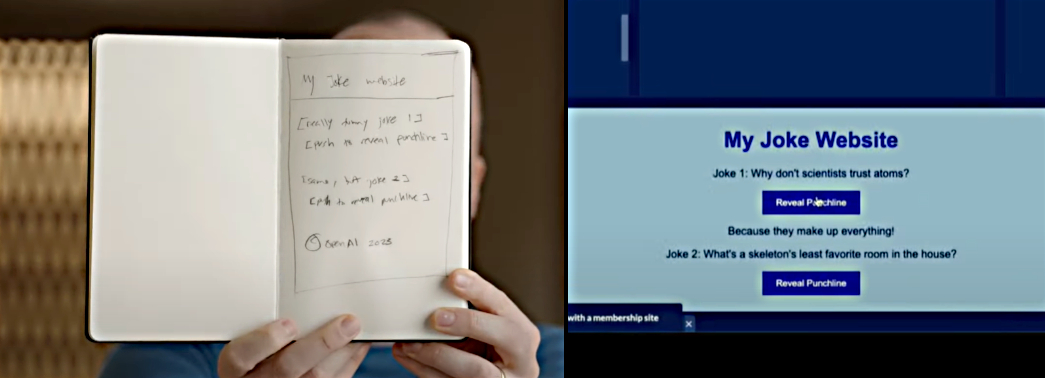
<p>Back in March, OpenAI demonstrated their newest model “GPT-4V” (the V is for Vision) on a dev stream:</p>

<p>In this <a href="https://www.youtube.com/live/outcGtbnMuQ?t=979">YouTube video at 16:19</a>, <a href="https://www.linkedin.com/in/thegdb">Greg Brockman</a> demonstrates turning a rough sketch of a website into a working prototype, almost instantly.</p>

<p><img src="https://blog.willgrant.org/images/openai-gpt4v-joke-website-demo.jpg" alt="A sketch to working code" /></p>

<p>In this example GPT-4V not only interpreted the image, but went on to write the HTML, CSS, and JavaScript for interactivity. It also wrote the jokes and punchlines (although the jokes aren’t great)! GPT-4V used a heading, as well as body copy, and styled the buttons to appear as clickable elements.</p>

<p><strong>Is it a huge leap to imagine a model in years (or more likely, months) from now that can generate User Interface, on the fly, in real-time?</strong></p>

<p>Imagine: an advanced digital experience layer understands the visitor and prompts a generative AI model with all the interface requirements, their methods, and something like:</p>

<blockquote>
  <p>“The user is a 30 year old IT professional, who has used the system 459 times previously, accessing at 2am local time from a mobile device, use only our design system to build the most suitable UI for the server management list view. Customize the action buttons for the user’s most likely task.”</p>
</blockquote>

<p>The front end code is generated and displayed - and it’s exactly what <em>this</em> user needs right <em>now</em>;</p>

<ul>
  <li>Tailored to their device viewport and interaction method</li>
  <li>Tailored to the likely task they want to perform</li>
  <li>Customized to the user’s preferences</li>
  <li>Streamlined and optimized for their familiarity and experience level</li>
  <li>Using the in-house design system to perfectly match the existing look and feel</li>
</ul>

<p>This imagined approach makes today’s personalization engines look like rudimentary templates.</p>

<p>How soon will we be using AI-generated front-end user interfaces?</p>

<h2 id="how-does-this-change-user-experience">How does this change user experience?</h2>

<p>As imagined, this kind of approach has the potential to massively improve user experience by providing a better-optimized user interface to each user.</p>

<p>Discoverability, usability and accessibility can all be enhanced by showing the user the right views, controls and flows at the right time - customized to their context.</p>

<p>There are challenges too: how does help and support work if every experience is different? How do we ensure that design ethics are followed and the AI doesn’t employ <a href="https://en.wikipedia.org/wiki/Dark_pattern">deceptive patterns</a> to manipulate users?</p>

<h2 id="how-does-this-change-design">How does this change design?</h2>

<p><a href="https://en.wikipedia.org/wiki/Design_system">Design Systems</a> become more vital than ever before.</p>

<p>Organizations with a robust, scalable design system comprising of a pattern library and front-end code components will be <em>first in line</em> to take advantage of this imagined technology.</p>

<p><strong>What are the designers designing?</strong> It’s no longer about laying out views, but instead about prompt engineering, design systems, and laying out the rules the AI must follow to produce the best interfaces.</p>

<blockquote>
  <p>We need a new framework or language to describe the front-end. Just as HTML and CSS separated structure and presentation, we need a new markup for “intent” or “abilities” in which the UI’s elements, methods and properties are defined in a declarative way - for the AI to assemble into a front-end dynamically.</p>
</blockquote>

<p>How do we measure and evaluate experience metrics if every experience is different? A new breed of user experience analytics will be needed to work with these dynamic front-ends where simple flow and drop-off metrics won’t be as useful.</p>

<h2 id="how-does-this-change-accessibility">How does this change accessibility?</h2>

<p>According to the WebAIM Million (2023), <a href="https://webaim.org/projects/million/#wcag">96% of the top 1M pages on the web have basic accessibility errors</a>, so we’re not exactly excelling so far in producing accessible front-end code.</p>

<p>Does generative AI produce accessible front-end experiences? It’s too soon to know, but we should show responsibility by building in checks for accessibility and training models on accessible code and accessibility guidelines. This is a huge opportunity to ensure that AI generated front-end code is accessible by default.</p>

<h2 id="will-this-make-every-website-and-application-a-dystopian-nightmare">Will this make every website and application a dystopian nightmare?</h2>

<p>Possibly. If design ethics and accessibility are ignored, the web would become a more manipulative place which excludes more people.</p>

<p>On the other hand, it has the potential to revolutionize access to systems - reduce learning curves, increase efficiency and truly allow access for all.</p>

<h2 id="how-likely-is-this-to-happen">How likely is this to happen?</h2>

<p>If experimentation with AI-generated UI is shown to predictably deliver greater user satisfaction, greater retention, or higher revenues for commercial entities: <em>it’s a certainty</em>.</p>]]></content><author><name></name></author><summary type="html"><![CDATA[This post contains a lot of questions and very few answers, I hope you enjoy it regardless and it triggers some thoughts. Back in March, OpenAI demonstrated their newest model “GPT-4V” (the V is for Vision) on a dev stream: In this YouTube video at 16:19, Greg Brockman demonstrates turning a rough sketch of a website into a working prototype, almost instantly. In this example GPT-4V not only interpreted the image, but went on to write the HTML, CSS, and JavaScript for interactivity. It also wrote the jokes and punchlines (although the jokes aren’t great)! GPT-4V used a heading, as well as body copy, and styled the buttons to appear as clickable elements. Is it a huge leap to imagine a model in years (or more likely, months) from now that can generate User Interface, on the fly, in real-time? Imagine: an advanced digital experience layer understands the visitor and prompts a generative AI model with all the interface requirements, their methods, and something like: “The user is a 30 year old IT professional, who has used the system 459 times previously, accessing at 2am local time from a mobile device, use only our design system to build the most suitable UI for the server management list view. Customize the action buttons for the user’s most likely task.” The front end code is generated and displayed - and it’s exactly what this user needs right now; Tailored to their device viewport and interaction method Tailored to the likely task they want to perform Customized to the user’s preferences Streamlined and optimized for their familiarity and experience level Using the in-house design system to perfectly match the existing look and feel This imagined approach makes today’s personalization engines look like rudimentary templates. How soon will we be using AI-generated front-end user interfaces? How does this change user experience? As imagined, this kind of approach has the potential to massively improve user experience by providing a better-optimized user interface to each user. Discoverability, usability and accessibility can all be enhanced by showing the user the right views, controls and flows at the right time - customized to their context. There are challenges too: how does help and support work if every experience is different? How do we ensure that design ethics are followed and the AI doesn’t employ deceptive patterns to manipulate users? How does this change design? Design Systems become more vital than ever before. Organizations with a robust, scalable design system comprising of a pattern library and front-end code components will be first in line to take advantage of this imagined technology. What are the designers designing? It’s no longer about laying out views, but instead about prompt engineering, design systems, and laying out the rules the AI must follow to produce the best interfaces. We need a new framework or language to describe the front-end. Just as HTML and CSS separated structure and presentation, we need a new markup for “intent” or “abilities” in which the UI’s elements, methods and properties are defined in a declarative way - for the AI to assemble into a front-end dynamically. How do we measure and evaluate experience metrics if every experience is different? A new breed of user experience analytics will be needed to work with these dynamic front-ends where simple flow and drop-off metrics won’t be as useful. How does this change accessibility? According to the WebAIM Million (2023), 96% of the top 1M pages on the web have basic accessibility errors, so we’re not exactly excelling so far in producing accessible front-end code. Does generative AI produce accessible front-end experiences? It’s too soon to know, but we should show responsibility by building in checks for accessibility and training models on accessible code and accessibility guidelines. This is a huge opportunity to ensure that AI generated front-end code is accessible by default. Will this make every website and application a dystopian nightmare? Possibly. If design ethics and accessibility are ignored, the web would become a more manipulative place which excludes more people. On the other hand, it has the potential to revolutionize access to systems - reduce learning curves, increase efficiency and truly allow access for all. How likely is this to happen? If experimentation with AI-generated UI is shown to predictably deliver greater user satisfaction, greater retention, or higher revenues for commercial entities: it’s a certainty.]]></summary></entry></feed>